Finance
How to automate loan file QC with rules your analysts can change
Automate loan file QC with rules your analysts can read and change, a calibrated judge for names, a routing table and test cases behind every release.
 Taras YaroshkoApplied AI, financial services15 min read
In short
A loan file QC workflow on Dynamiq reads extracted documents, runs the checklist as rules a QC analyst can read and change, and asks a calibrated judge only where text cannot decide. A decision table the business owns routes each loan, every finding shows the values it read, and test cases prove each release before it ships.
A loan file QC workflow on Dynamiq reads the fields your extraction step pulled from each document, runs your checklist as plain rules, asks a calibrated judge whether two names are the same party, and routes the loan to a queue. It holds up in an audit because every finding quotes the rule, shows the values it read, and runs on a saved, tested and traced version of the workflow.
We built the example in this post on synthetic data so every screenshot is real: eleven invented loans, one fictional watchlist, and the same workflow you can build in a free account.
Why do loan QC checklists outgrow rule engines and spreadsheets?
A mortgage file is a few hundred pages: the note, the deed of trust, the Closing Disclosure, the loan application, the appraisal, the automated underwriting findings, the credit report, flood and hazard insurance, and more. Quality control checks that file against a checklist, whether it runs before funding, after closing, in due diligence, before a purchase or at servicing boarding. Each failed check is a defect, and defects are graded by severity.
The checklist is rarely the hard part. Keeping the automation in step with it is:
- Checklists change often. Agencies and investors update their guidelines several times a year, and each change has to reach whatever runs the checks.
- The automation sits where analysts cannot reach it. In a Java rule engine, a BRMS, or spreadsheets and macros, changing one threshold is a developer ticket, and checks that are awkward to code stay manual.
- Extracted data is messy. OCR and IDP return "$412,500.00", "6.375%", "TBD" or a blank, each with a confidence. A check that quietly reads "TBD" as zero passes a loan it should stop.
- Some checks need judgment. "Jon Reyes" and "Jonathan Reyes" are the same borrower. A loan officer one letter off a watchlist entry probably is not the listed person, but someone should look. String matching gets both wrong.
- A model on its own is hard to defend. The same file can get two answers, and an auditor wants to know which value failed which rule.
What does an automated loan file review look like?
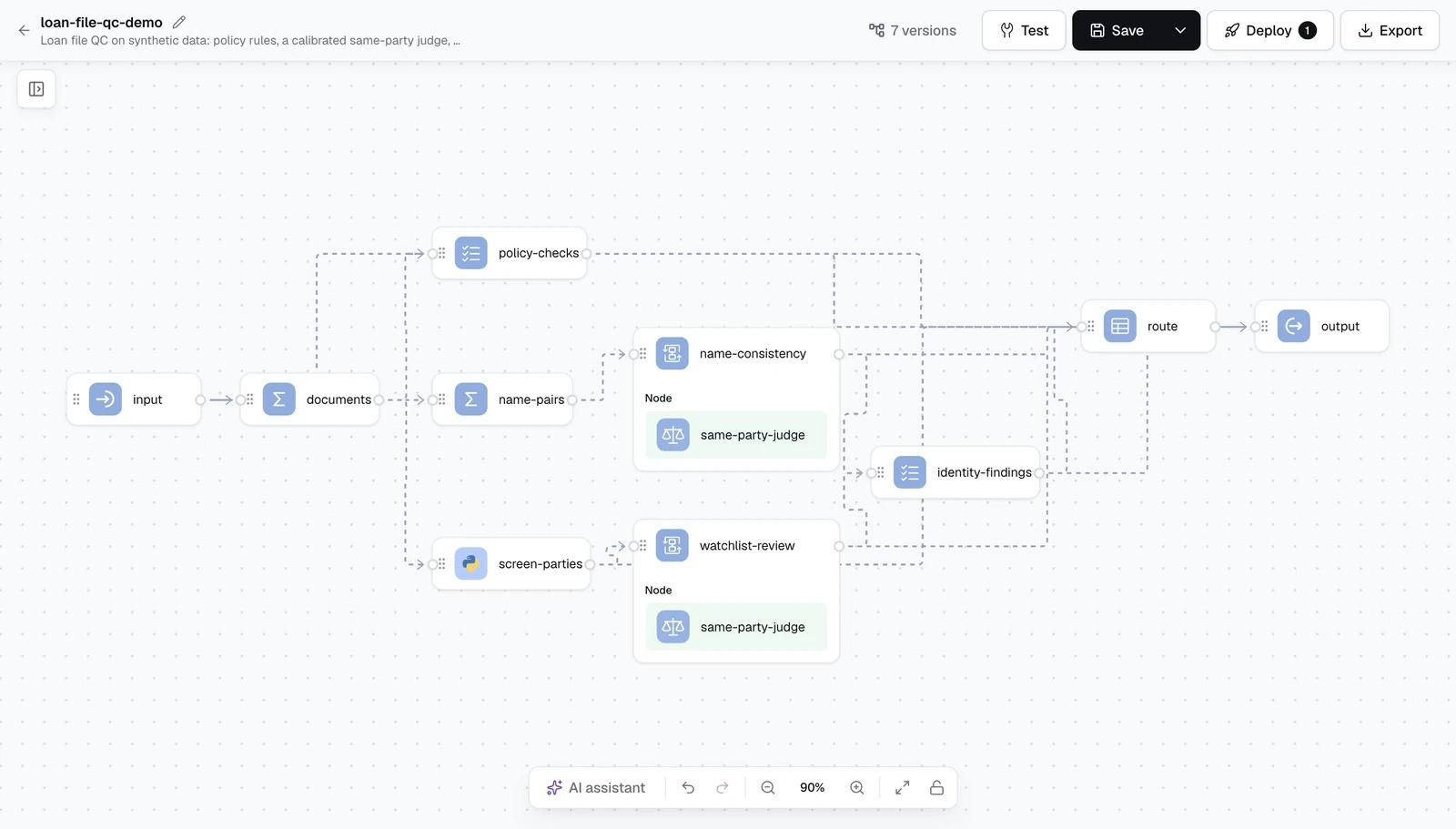
The workflow takes the documents an extraction step already produced. Each document has a type such as PROMISSORY_NOTE or CLOSING_DISCLOSURE, a signed flag, a received time, and extracted fields, each with a value and a confidence.
- documents (Expression) picks one copy of each document type: the latest signed one. Drafts and duplicates stop here, in one place.
- policy-checks (Rules) runs the checklist: amounts, rates, dates, ages, ratios, required documents and extraction confidence.
- name-pairs (Expression) lists every borrower name that differs, as text, between the note and the other documents.
- screen-parties (Custom Function) collects every party in the file (borrower, lender, loan officer, appraiser, appraisal company, employer, insurer) and returns close calls against the lender's watchlist. It matches loosely on purpose; it decides nothing.
- name-consistency and watchlist-review (Map) send each pair to a Judgement node, a few at a time.
- identity-findings (Rules) turns the judge's answers into findings.
- route (Decision table) picks the queue and priority:
clear,analyst-review,cureorreject.
Rules your QC team can read and change
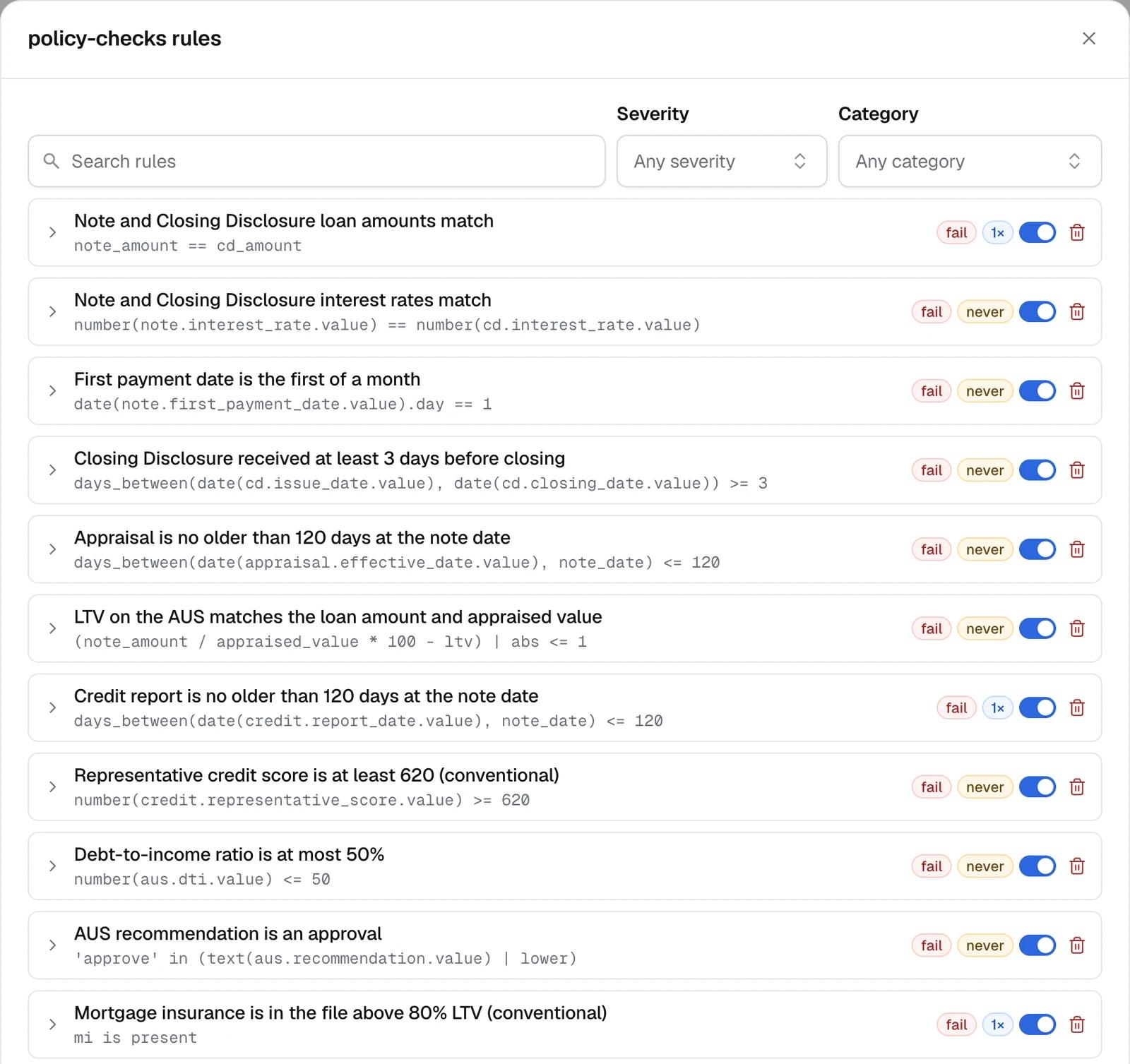
A rule in the Rules node reads like the checklist row it automates. It has a name, a category, a severity (fail, warn or info), an optional condition for when it applies, the check itself, a message that inserts the values it read, a reason code and references. Derived values are named facts computed once per loan, so rules stay short:
note_amount = number(note.loan_amount.value)
cd_amount   = number(cd.loan_amount.value)
note_date   = date(note.note_date.value)
loan_type   = text(application.loan_type.value) | lower
ltv         = number(aus.ltv.value)
Three rules from the demo:
- name: Note and Closing Disclosure loan amounts match
  severity: fail
  check: note_amount == cd_amount
  message: >
    Loan amount is {{ note.loan_amount.value }} on the Note
    but {{ cd.loan_amount.value }} on the Closing Disclosure.

- name: Mortgage insurance is in the file above 80% LTV (conventional)
  severity: fail
  applies_when: loan_type == 'conventional' and ltv > 80
  check: mi is present
  message: >
    Conventional loan at {{ aus.ltv.value }} LTV, but no mortgage
    insurance certificate is in the file.

- name: Closing Disclosure received at least 3 days before closing
  severity: fail
  check: days_between(date(cd.issue_date.value), date(cd.closing_date.value)) >= 3
  references: ["CFPB TRID, 12 CFR 1026.19(f)(1)(ii)"]
The demo's thresholds are illustrations, not compliance advice. The point is who can change them: an analyst who can read ltv > 80 can maintain it.
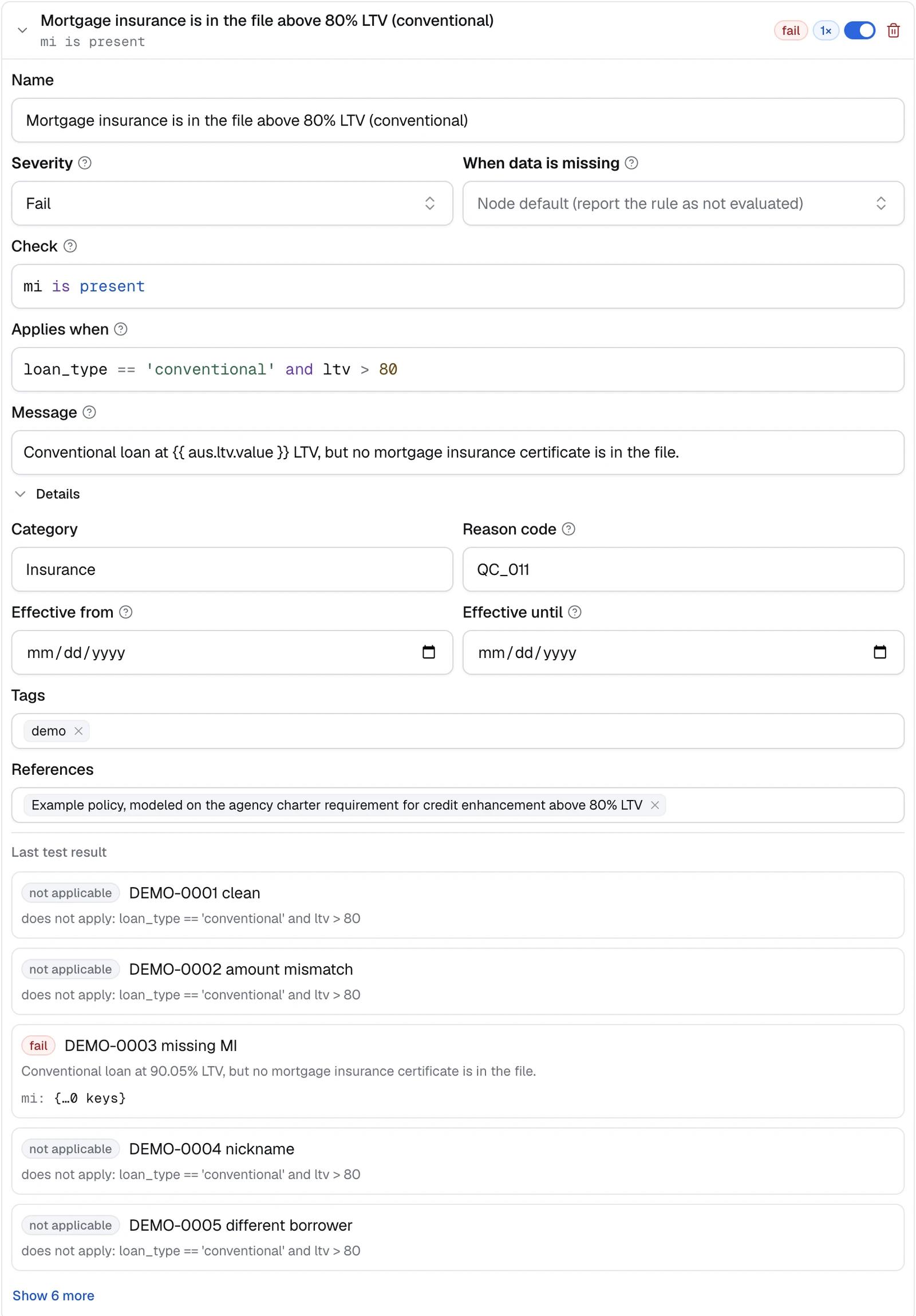
Four details decide whether rules hold up on real extracted data:
- Missing is not pass. Each rule, or the whole node, says what missing data means: report the rule as not evaluated, fail it, or treat it as not applicable. A loan never clears because a value was absent.
- Unreadable is not zero.
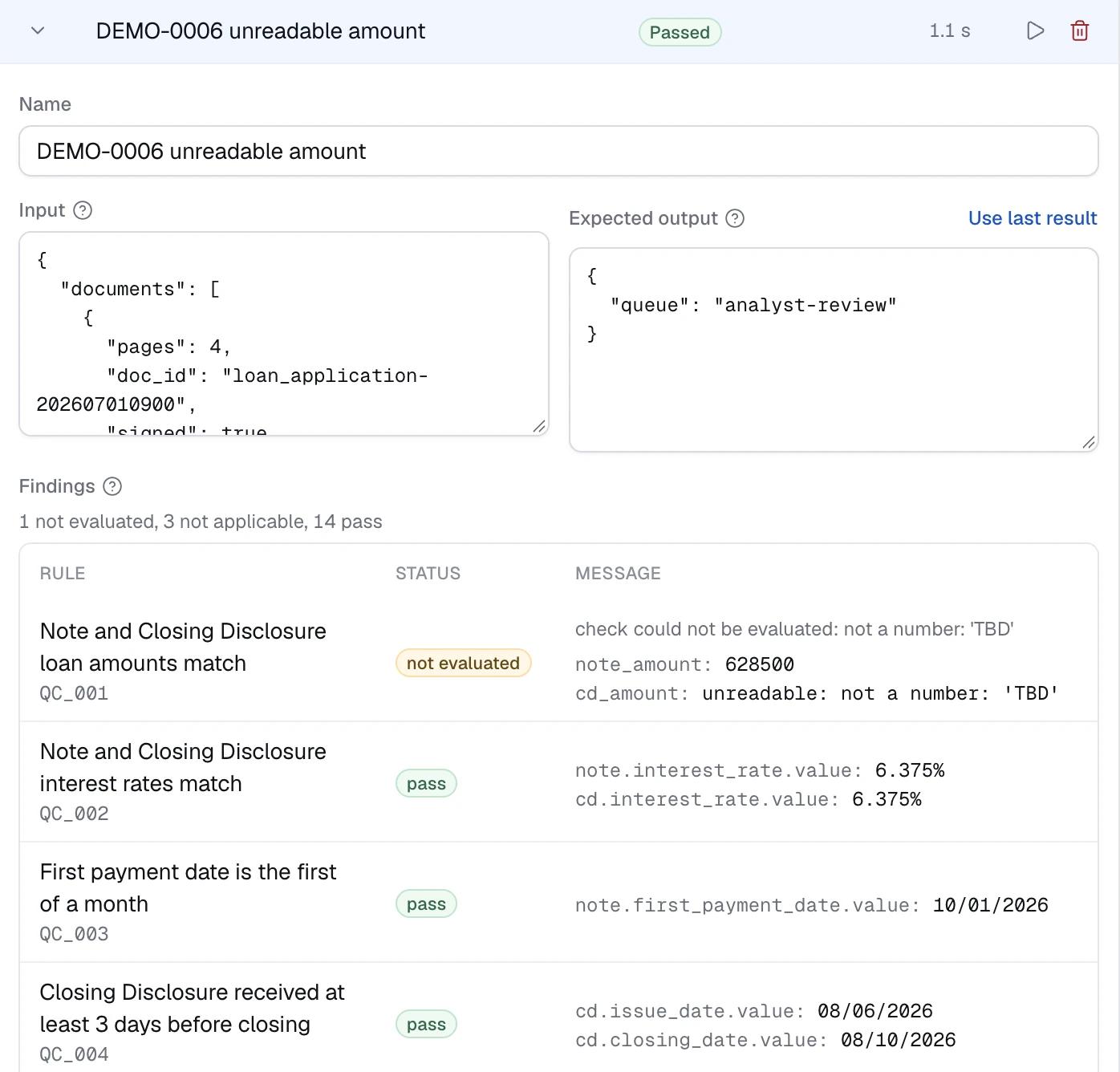
number()reads "$412,500.00" and "6.375%", and reports "TBD" as not a number. In the demo, a Closing Disclosure amount of "TBD" makes the amount check not evaluated, and the loan goes to an analyst. - Rules have dates. Each rule carries effective from and until dates and an on/off switch, so a guideline change can be scheduled rather than deployed at midnight.
- Rules travel as CSV. Export the list, review it in a spreadsheet with compliance, and import it back.
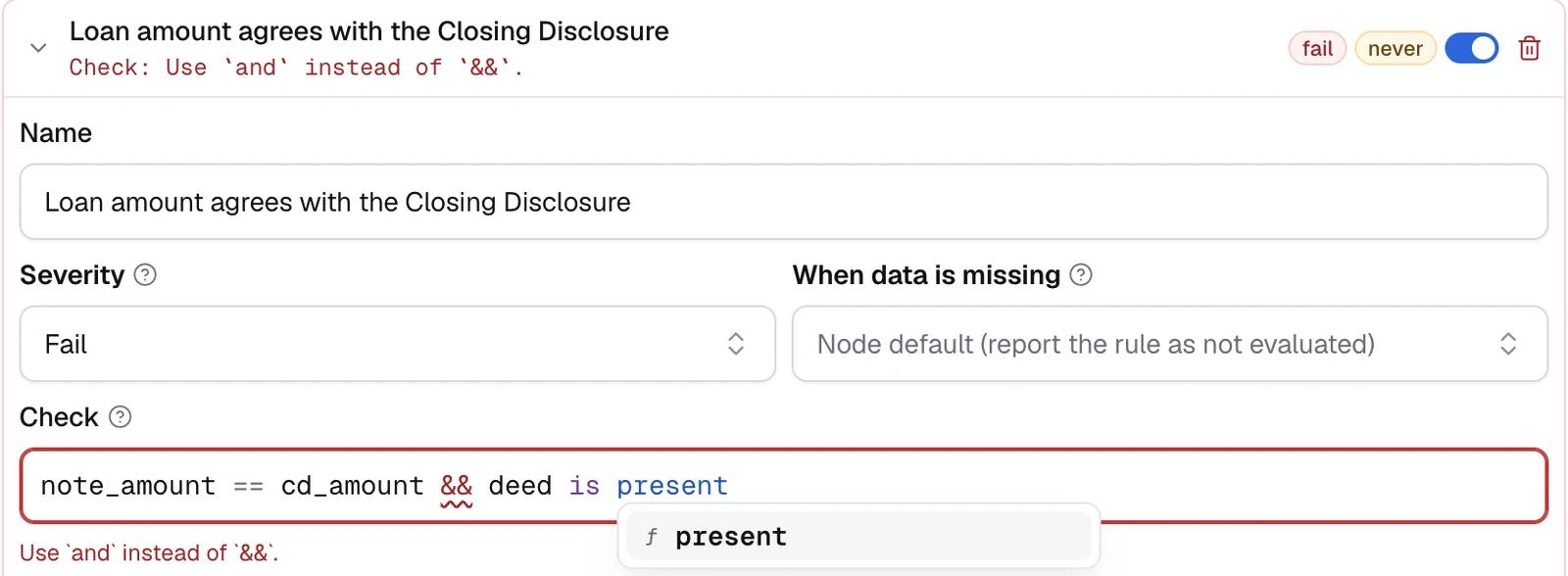
The expression editor highlights syntax, colors bracket pairs, completes the names of inputs, derived values and helpers, and lints as you type: write && and it says to use and instead.
When text alone cannot decide: a calibrated judge
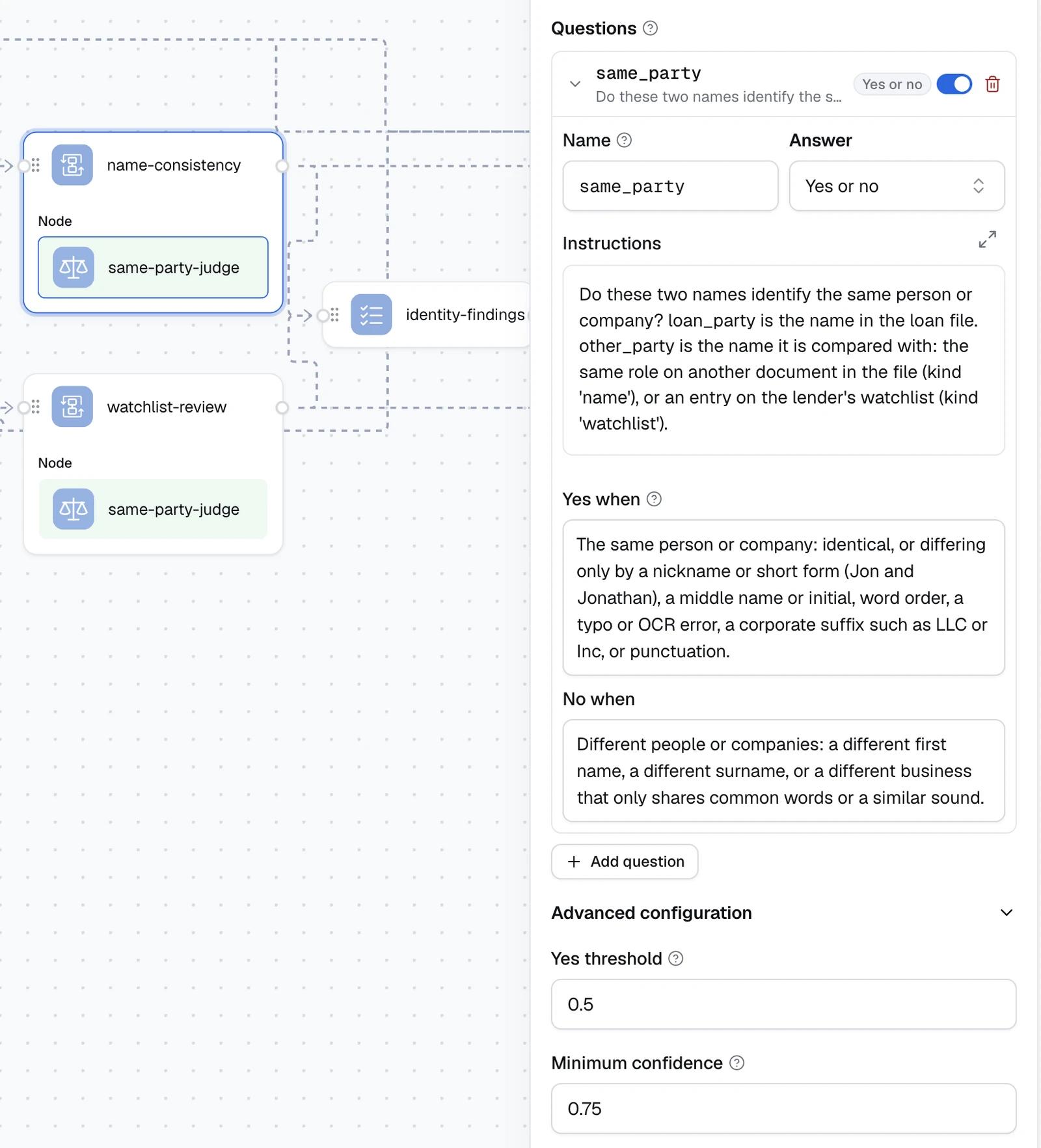
Two checks in a loan file are about identity, not arithmetic: is the borrower the same person on every document, and is any party on the lender's watchlist? We ask one narrow yes-or-no question, "Do these two names identify the same person or company?", with plain-English guidance on when the answer is yes (a nickname, a middle initial, word order, a typo, a corporate suffix) and when it is no (a different first name, a different surname, a different business that only shares common words).
The judge is TypeSafe System One, which returns calibrated probabilities, so each answer comes with a confidence. Below a minimum confidence, set to 0.75 in the demo, the answer is flagged for review instead of being used. Nothing is cleared on a guess. The Judgement node can also use an LLM or an agent as the judge.
In the demo this resolves three different cases:
- Jonathan on the note, Jon on the Closing Disclosure. The judge says same person, and the loan clears.
- A different person on the deed of trust. The judge says different, and the loan goes to
cure. - A loan officer one letter off a watchlist entry, and an appraisal company that is on the list. The screening step sends both to the judge. The listed company is confirmed with a confidence of 0.98, so the loan is rejected. For the loan officer the judge leans toward "same person" but only with a confidence near 0.7, below the minimum, so that match is flagged for an analyst rather than decided.
Your routing policy as a table
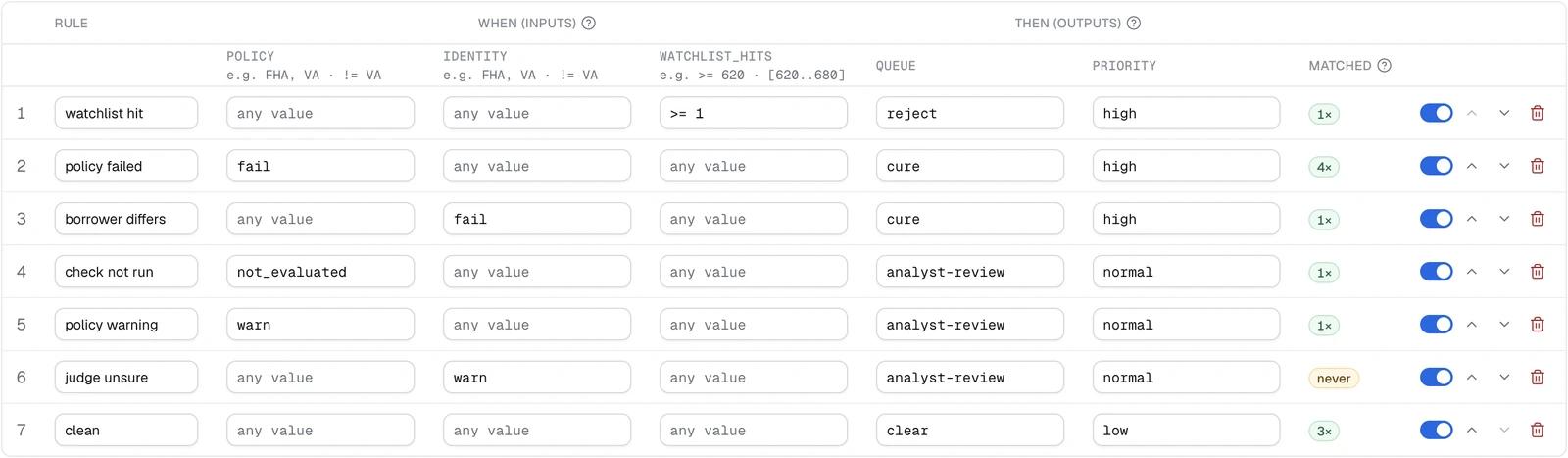
Queue and priority come from a decision table, not code. The demo's table, row by row:
| Row | When | Queue | Priority | Test loans matched |
|---|---|---|---|---|
| watchlist hit | a party is confirmed on the watchlist | reject | high | 1 |
| policy failed | a policy check failed | cure | high | 4 |
| borrower differs | the judge says a document names a different borrower | cure | high | 1 |
| check not run | a policy check could not be evaluated | analyst-review | normal | 1 |
| policy warning | a policy check warned | analyst-review | normal | 1 |
| judge unsure | a match was below the minimum confidence | analyst-review | normal | never |
| clean | anything else | clear | low | 3 |
Columns are typed, rows can be reordered and switched off, and the table imports and exports as CSV. The Matched column is worth a look: "judge unsure" never decided a loan in this set, because the only unsure match came with a confirmed watchlist hit, which wins. A row no test loan reaches needs a test loan.
How do you know it works?
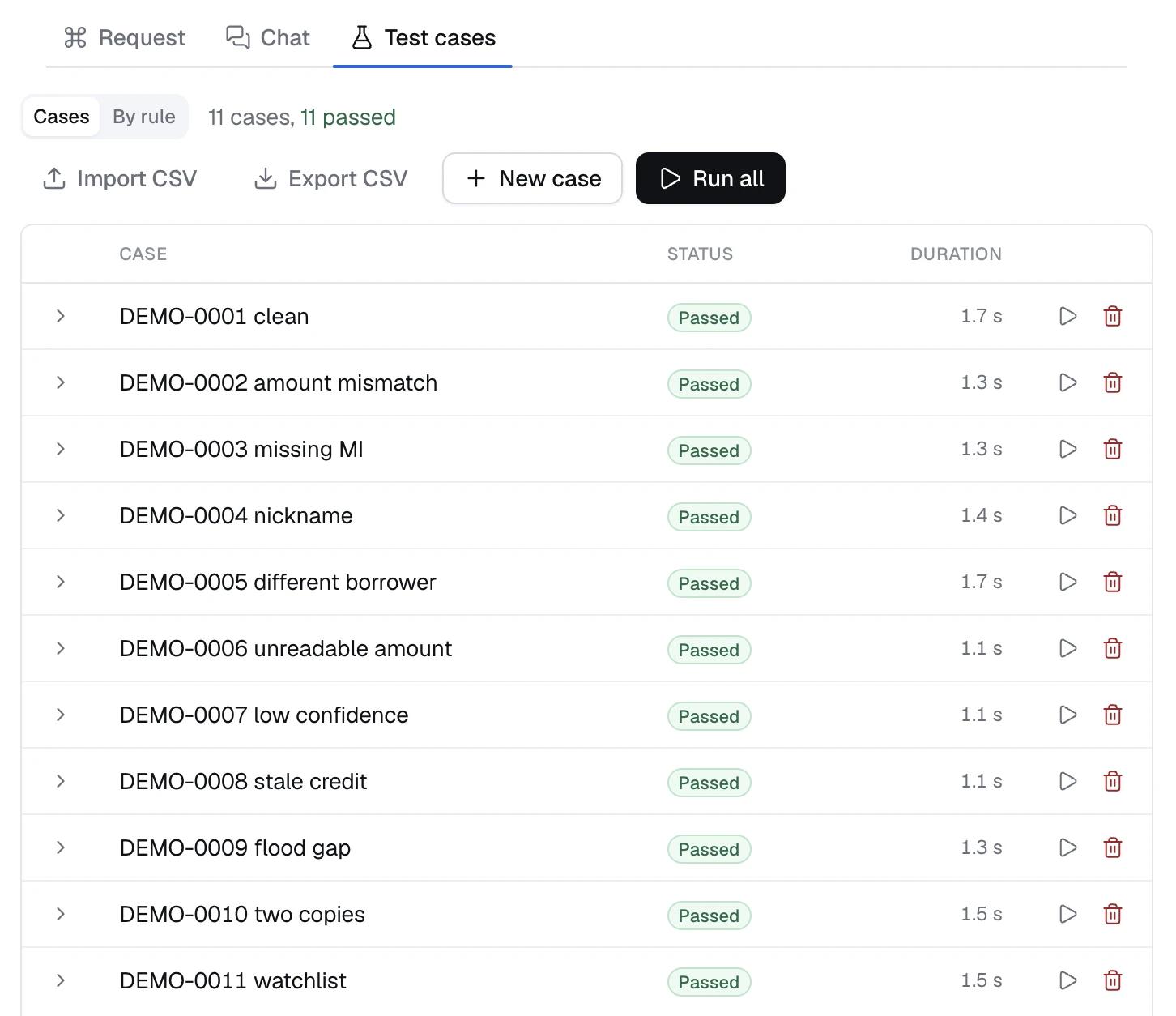
Every loan we care about is a saved test case with the output it must produce. Run all replays them after every change. We include a planted case: a copy of a clean loan with deliberate defects, a loan officer one letter off a watchlist entry and a listed appraisal company, so screening is tested on every release.
| Loan | What it shows | Queue |
|---|---|---|
| DEMO-0001 | Every check passes | clear |
| DEMO-0002 | Closing Disclosure amount $1,000 higher than the note | cure |
| DEMO-0003 | Conventional loan at 90% LTV, no mortgage insurance certificate | cure |
| DEMO-0004 | Jonathan on the note, Jon on the Closing Disclosure | clear |
| DEMO-0005 | A different person on the deed of trust | cure |
| DEMO-0006 | Closing Disclosure loan amount reads "TBD" | analyst-review |
| DEMO-0007 | Note interest rate extracted with 41% confidence | analyst-review |
| DEMO-0008 | Credit report 150 days old at the note date | cure |
| DEMO-0009 | Flood zone AE, no flood insurance in the file | cure |
| DEMO-0010 | An unsigned draft and a signed final Closing Disclosure | clear |
| DEMO-0011 | Watchlist near-miss and a listed appraisal company | reject |
All eleven pass on the platform with the real judge, and the outcomes in the table are what it produced.
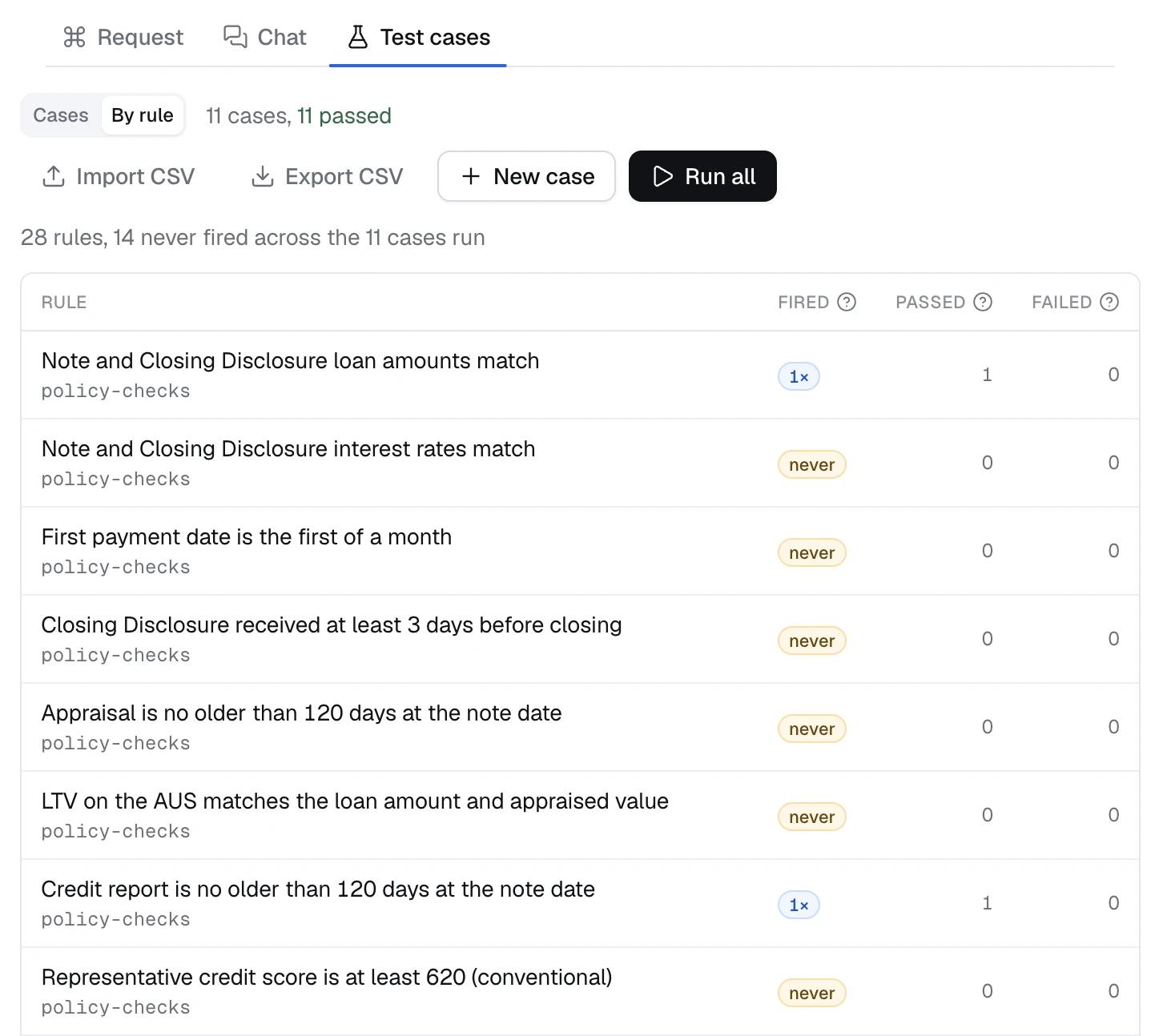
The By rule view shows, for every rule and every row of the routing table, how many saved cases it fired in. In our demo it reads 28 rules, 14 never fired across the 11 cases. That is the point of the view: each rule marked never is one no test loan has exercised yet, and the next test case to write.
From canvas to production: versions, the API and traces
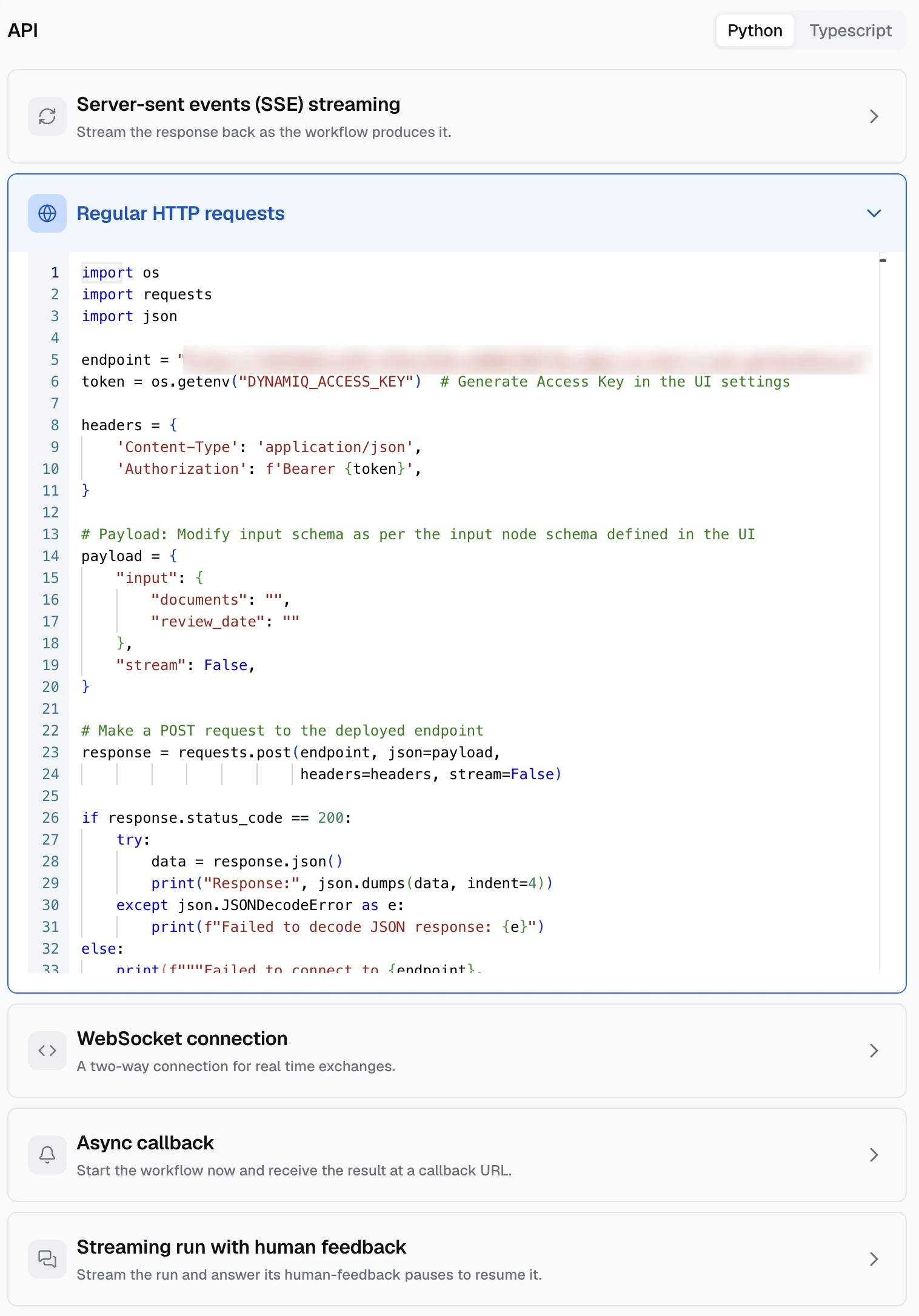
Every save is a version, and you deploy the version the API runs. The integration tab gives ready-made Python and TypeScript for regular HTTP requests, server-sent events streaming, WebSocket, async callbacks and streaming runs that pause for human feedback, and access keys can be scoped to a project or the organization, with an expiry. Every run is traced with each step's inputs and outputs, so months later you can show exactly why a loan went where it went. See observability and deployment options.
How we approach a migration from a legacy rule engine
When a lender or review firm already has a rule engine, we start from the written checklist, not the code:
- The checklist is the source of truth. The old engine shows how each test was implemented. Where the two disagree, we follow the checklist and list every difference for the business to confirm.
- Account for every row. Each checklist row ends up as one of four things: automated; waiting for a value the extraction does not produce yet; needing an outside system, such as a fraud tool or a custodian; or a process step that is not a data check. That coverage map turns "how much is automated?" into a precise answer and gives the extraction team a to-do list.
- Deterministic first. Comparisons, dates and presence checks become rules. Judgment is reserved for the questions text cannot settle.
- Audit against the source documents. Before go-live, we check each finding on the test loans against the actual pages. Some findings are real defects; some are extraction errors, and those go back to the extraction team.
Where else does this pattern fit?
| Use case | What is checked | Nodes doing the work |
|---|---|---|
| Prefunding QC | Note and Closing Disclosure agree; disclosure timing; insurance in place; AUS data matches the file | Expression, Rules, Decision table |
| Post-closing QC | The full checklist on a sample or every loan, with defect severity | Rules, Judgement, Decision table, test cases |
| Due diligence and pre-purchase review | Investor guidelines; data integrity across documents; parties screened | Rules, Map and Judgement, Custom Function, Decision table |
| Servicing boarding | Boarded data against the note and Closing Disclosure; required documents present | Expression, Rules |
| Watchlist and party screening | Borrowers, loan officers, appraisers, vendors and employers against internal lists | Custom Function, Map and Judgement, Rules |
| Insurance underwriting audit | Application against policy documents; required forms; underwriter authority | Rules, Judgement |
| Accounts payable | Invoice against purchase order and receipt; vendor screening | Expression, Rules, Judgement |
The shape is the same each time: extracted documents, a checklist, a few judgment calls and a routing decision. More in document review, back-office operations, KYC and onboarding, financial services and insurance.
How does this compare with other approaches?
| Java rule engine or BRMS | LLM-only agent | RPA bots | Dynamiq workflow | |
|---|---|---|---|---|
| Who changes a rule | A developer | Whoever edits the prompt | A developer | A QC analyst, in plain expressions |
| Same input, same answer | Yes | Not guaranteed | Yes | Yes for rules and tables; the judge's answers carry a confidence |
| Names and near-matches | Hand-coded | Possible, without a calibrated score | Usually not | A calibrated judge, with a review threshold |
| Tested before release | Separate tooling | Rarely built in | Rarely built in | Test cases in the editor, with rule coverage |
| Explaining a finding | Logs | Hard to reconstruct | Screenshots | Each finding shows the values it read; every run is traced |
How does Dynamiq compare with Copilot Studio, n8n and LangGraph for loan QC?
Each is a strong tool for the job it was built for. For a loan QC checklist, the questions that matter are where the files are processed, who owns the rules, and how you prove a release is right.
- Microsoft Copilot Studio suits teams standardized on Microsoft 365 and Power Platform, where business users build agents for Teams. It runs only as a Microsoft-hosted service. Dynamiq runs on Dynamiq Cloud, in your own AWS, Azure, GCP, IBM Cloud or OpenShift, or on-prem, so loan files stay in the environment your auditors already approved.
- n8n is a mature workflow automation platform with a very large integration library, and it adds guardrails, human approvals and evaluations to those workflows. Dynamiq treats the checklist itself as the product: rules with severities, a missing-data policy, effective dates and coverage from test cases, a calibrated judge for identity questions, and a routing table the business reads.
- LangGraph gives developers low-level control over agent orchestration in code. There, every checklist rule is code a developer owns. On Dynamiq, a QC analyst edits the rule on the canvas, and developers still get the same engine as an Apache-2.0 Python SDK.
How to start
Build the workflow in a free account: Start free, then follow the docs for the Rules node, Judgement node, Decision table, Expression node, Map node and test cases. If you want to see it on your own files and checklist, talk to the team.
FAQ
Can our analysts change rules without a developer?
Yes. Rules are plain expressions such as note_amount == cd_amount, with a name, severity, message and references. Analysts edit them in the canvas, export and import them as CSV, and run the saved test cases before the change is deployed.
What happens when extracted data is missing or unreadable?
Each rule decides what missing data means: not evaluated, fail or not applicable. Text that is not a number, such as "TBD", is reported as unreadable rather than read as zero. In the demo, both route the loan to an analyst.
How does the judge decide, and when does a person review?
The judge answers one narrow question, such as whether two names identify the same person, with a calibrated probability and a confidence. Below the minimum confidence you set, the answer is flagged and the loan goes to an analyst.
Can it run on our extraction vendor's output?
The workflow reads documents as structured fields with values and confidences. If your OCR or IDP vendor produces fields, the documents step maps them; changing vendors changes that mapping, not the rules.
How is every decision audited?
Every save is a version, the API runs the version you deploy, and every run is traced with each step's inputs and outputs. Each finding carries the rule's message, its reason code and the values it read.