Model Training
AMD Instinct MI250 vs NVIDIA A100: the LLM inference showdown
Our vLLM benchmark of the AMD Instinct MI250 against NVIDIA A100 40GB and 80GB on 7B to 14B models: throughput, latency, setup and what it means today.
 Vitalii DukFounder and CEO7 min readUpdated
In short
In our mid-2024 vLLM benchmark, the NVIDIA A100 beat the AMD Instinct MI250 on every model we tested. The MI250 reached about 84% of the A100 40GB's throughput on 7B to 8B models and about 76% on 11B to 14B models, and the A100 80GB was faster still. Both GPUs are now a generation old, so read the results as a snapshot of that hardware and software, not a buying guide.
In our mid-2024 benchmark with vLLM 0.5.0, the NVIDIA A100 was faster than the AMD Instinct MI250 on every model we tested. The MI250 reached about 84% of the A100 40GB's throughput on 7B to 8B models and about 76% on 11B to 14B models, while the A100 80GB led both. The MI250's strength is memory: 128 GB of HBM2e per card, which matters more as models and context windows grow.
Which GPUs did we compare?
We compared AMD's Instinct MI250 with two versions of NVIDIA's A100, all data center GPUs aimed at AI and high-performance computing:
| Specification | NVIDIA A100 40GB SXM | NVIDIA A100 80GB SXM | AMD Instinct MI250 |
|---|---|---|---|
| Architecture | NVIDIA Ampere | NVIDIA Ampere | AMD CDNA 2 |
| Power | 400 W | 400 W | 500 W |
| GPU memory | 40 GB HBM2 | 80 GB HBM2e | 128 GB HBM2e |
| FP32 | 19.5 TFLOP/s | 19.5 TFLOP/s | 45.3 TFLOP/s |
| FP16/BF16 (matrix) | 312 TFLOP/s | 312 TFLOP/s | 362 TFLOP/s |
| Memory bandwidth | 1,555 GB/s | 2,039 GB/s | 3,277 GB/s |
| L2 cache | 40 MB | 40 MB | 16 MB |
The MI250 figures are for the whole card. An MI250 package holds two graphics compute dies (GCDs), each with 64 GB of memory, and the ROCm runtime treats each die as a separate GPU. That detail matters for reading the results below.
How did we run the benchmark?
We used vLLM, a widely used open-source LLM serving engine, with the same settings on both platforms:
- Batch size: 8, to measure how each GPU handles several prompts at once
- GPU memory utilization: 90%
- Tensor parallel size: 1, to measure a single GPU
| Stack | AMD MI250 machine | NVIDIA A100 machines |
|---|---|---|
| Linux distribution | Ubuntu 20.04 | Ubuntu 20.04 |
| GPU software | ROCm 6.1.2 | CUDA 12.1 |
| GPU communication | RCCL 2.18.6 | NCCL 2.18.3 |
| Inference engine | vLLM 0.5.0 | vLLM 0.5.0 |
We ran the benchmark_throughput.py and benchmark_latency.py scripts from the vLLM repository. Throughput runs used prompts from the ShareGPT dataset in batches of 8. Latency runs used randomly generated prompts of a fixed length, so every request in a batch had the same input and output size.
With a tensor parallel size of 1, each vLLM process runs on a single ROCm device. On the MI250 that is one of its two dies, so the MI250 results compare one die with one full A100.
How fast was the MI250 compared with the A100?
7B to 8B models
These models, such as Llama 3 8B, Mistral 7B and Gemma 7B, are popular starting points for fine-tuning.
| Model | Metric | MI250 | A100 40GB | A100 80GB |
|---|---|---|---|---|
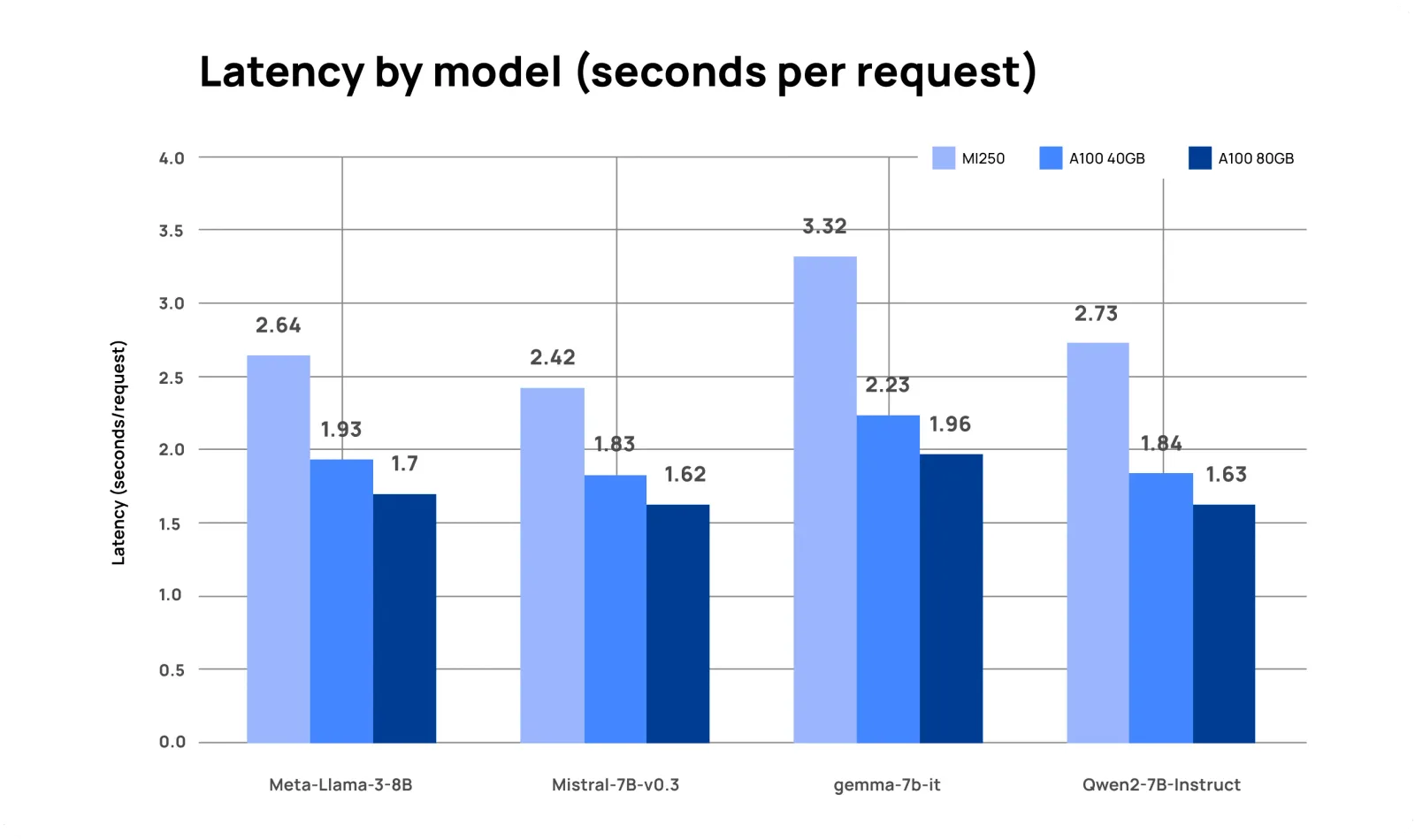
| Meta-Llama-3-8B | Latency (s/request) | 2.64 | 1.93 | 1.70 |
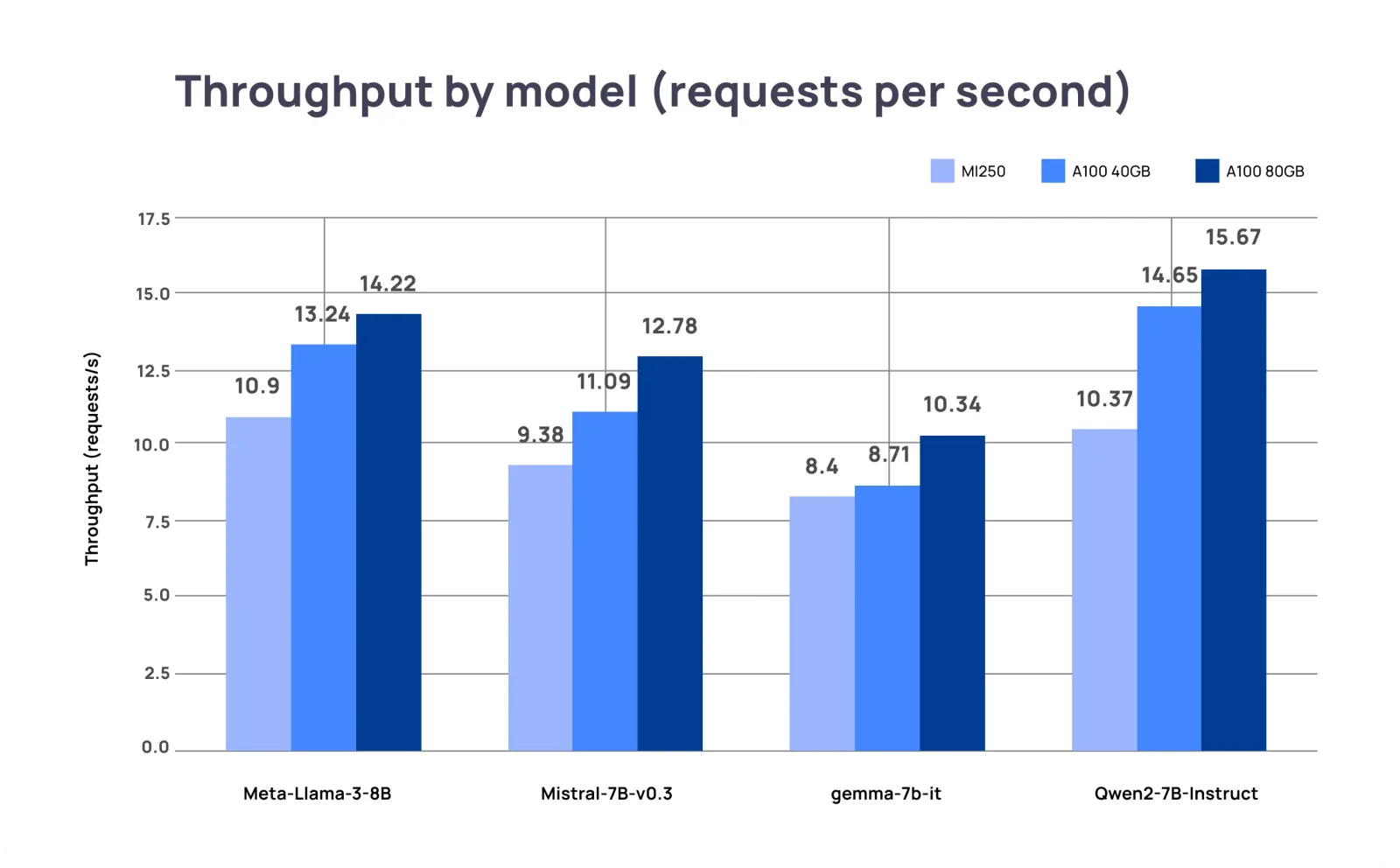
| Meta-Llama-3-8B | Requests per second | 10.90 | 13.24 | 14.22 |
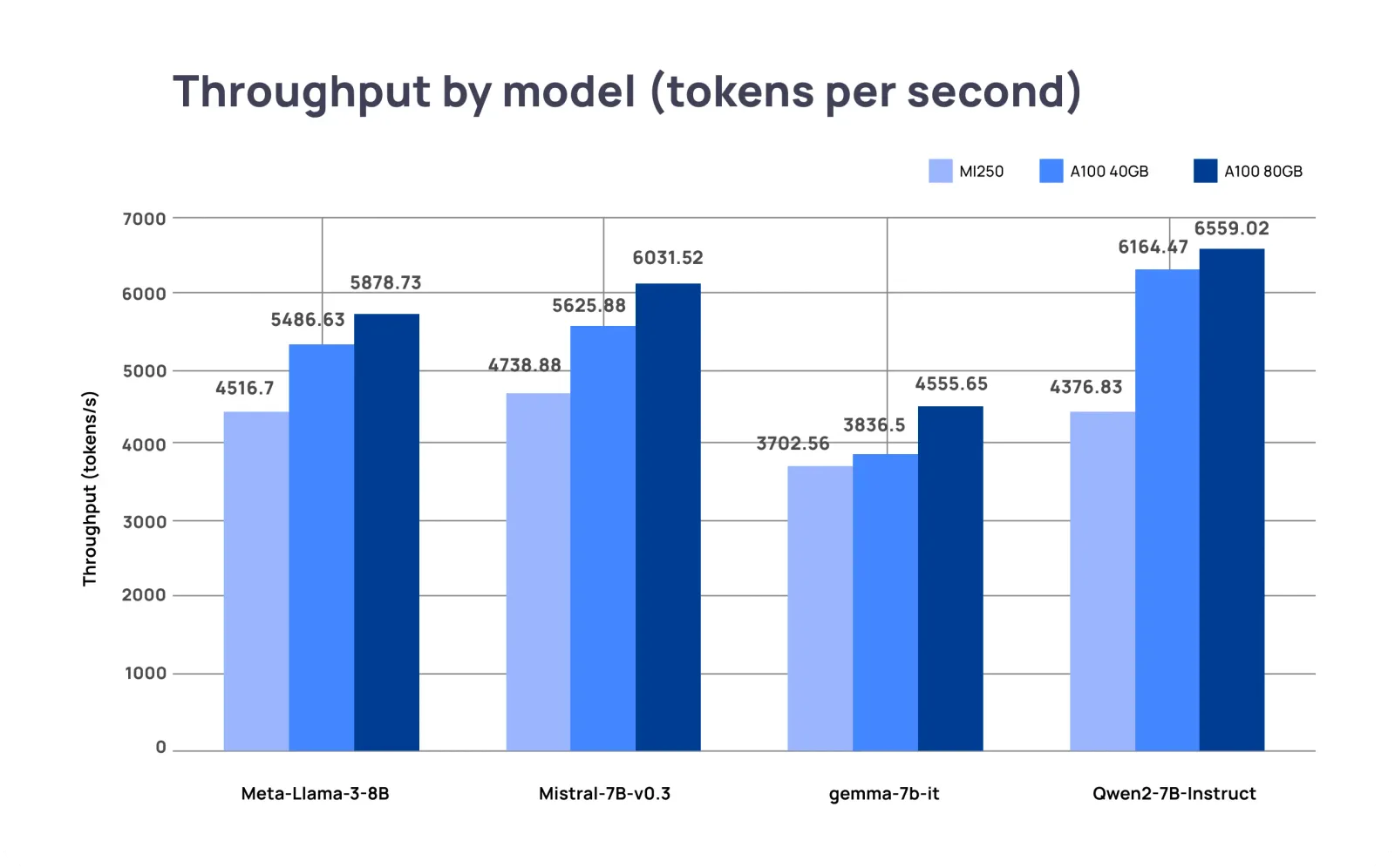
| Meta-Llama-3-8B | Tokens per second | 4,517 | 5,487 | 5,879 |
| Mistral-7B-v0.3 | Latency (s/request) | 2.42 | 1.83 | 1.62 |
| Mistral-7B-v0.3 | Requests per second | 9.38 | 11.09 | 12.78 |
| Mistral-7B-v0.3 | Tokens per second | 4,739 | 5,626 | 6,032 |
| gemma-7b-it | Latency (s/request) | 3.32 | 2.23 | 1.96 |
| gemma-7b-it | Requests per second | 8.40 | 8.71 | 10.34 |
| gemma-7b-it | Tokens per second | 3,703 | 3,837 | 4,556 |
| Qwen2-7B-Instruct | Latency (s/request) | 2.73 | 1.84 | 1.63 |
| Qwen2-7B-Instruct | Requests per second | 10.37 | 14.65 | 15.67 |
| Qwen2-7B-Instruct | Tokens per second | 4,377 | 6,164 | 6,559 |
On these models, the MI250 delivered 71% to 96% of the A100 40GB's throughput (about 84% on average) and 66% to 81% of the A100 80GB's. Its latency per request was 1.3 to 1.5 times the A100 40GB's.
11B to 14B models
| Model | Metric | MI250 | A100 40GB | A100 80GB |
|---|---|---|---|---|
| Llama-2-13b-chat-hf | Latency (s/request) | 4.16 | 3.78 | 2.67 |
| Llama-2-13b-chat-hf | Requests per second | 2.60 | 3.61 | 6.36 |
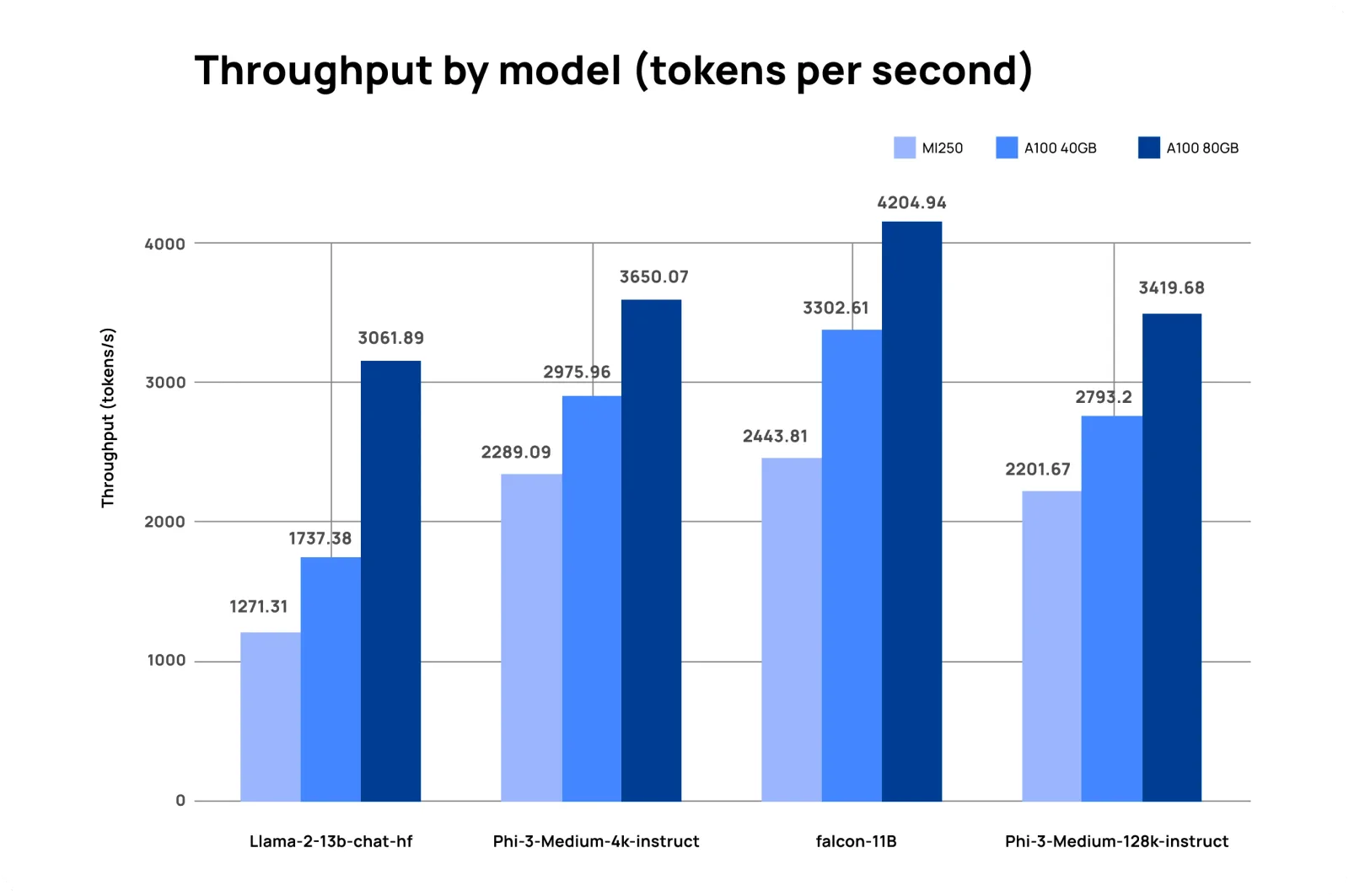
| Llama-2-13b-chat-hf | Tokens per second | 1,271 | 1,737 | 3,062 |
| Phi-3-Medium-4k-instruct | Latency (s/request) | 3.45 | 2.88 | 2.11 |
| Phi-3-Medium-4k-instruct | Requests per second | 4.86 | 6.19 | 7.59 |
| Phi-3-Medium-4k-instruct | Tokens per second | 2,289 | 2,976 | 3,650 |
| falcon-11B | Latency (s/request) | 3.89 | 3.21 | 2.49 |
| falcon-11B | Requests per second | 4.64 | 6.17 | 9.19 |
| falcon-11B | Tokens per second | 2,444 | 3,303 | 4,205 |
| Phi-3-Medium-128k-instruct | Latency (s/request) | 3.78 | 2.99 | 2.20 |
| Phi-3-Medium-128k-instruct | Requests per second | 4.58 | 5.81 | 7.11 |
| Phi-3-Medium-128k-instruct | Tokens per second | 2,202 | 2,793 | 3,420 |
On the larger models, the MI250 delivered 72% to 79% of the A100 40GB's throughput (about 76% on average) but only 41% to 64% of the A100 80GB's. The A100 80GB's extra memory and bandwidth pay off here: more room for the KV cache means more requests in flight.
What do the results mean?
Three things stood out:
- The comparison was one die against one GPU. Each MI250 result used one of the card's two dies, which has about half of the card's compute and memory bandwidth. Seen that way, one die reaching 76% to 84% of an A100 40GB's throughput is a solid result, and a full card can serve a second model replica on its other die. We did not measure that configuration, but it belongs in any price-performance comparison.
- Software maturity mattered. CUDA's mature kernels and vLLM's longer history on NVIDIA hardware were an advantage in 2024. vLLM's support for ROCm has improved since.
- Memory decides what fits. The MI250's 64 GB per die holds larger models or longer contexts than an A100 40GB can, which is worth more than raw speed for some workloads.
Do these results still hold in 2026?
Treat them as a snapshot. Both GPUs are now a generation or more behind AMD's Instinct MI300 series and NVIDIA's H100 and later GPUs, and vLLM and ROCm have both changed a great deal since version 0.5.0 and 6.1.2. The method still applies: fix the serving engine and settings, test the models you actually run, and measure throughput and latency at your real batch sizes.
How should you choose inference hardware for enterprise agents?
Agent workloads make many model calls per task, so the cost and speed of each call add up. When you size hardware for self-hosted models, check:
- Memory per GPU for your largest model plus the KV cache your context lengths and concurrency need.
- Throughput at your real batch sizes, measured with your prompts, not a vendor's.
- Latency per request, which users feel directly in chat and voice agents.
- Software support for your serving engine and model architectures on that hardware.
- Availability in your cloud region or data center, which often decides more than benchmarks do.
On Dynamiq, you can run open models on managed inference and fine-tune them with LoRA adapters, or call the most-used hosted models through one AI Gateway endpoint; see models.
For hardware inside your own perimeter, Dynamiq runs self-hosted on any Kubernetes cluster; see where Dynamiq runs.
FAQ
Is the AMD MI250 faster than the NVIDIA A100 for LLM inference?
Not in our 2024 tests. With vLLM 0.5.0, one MI250 die reached about 84% of an A100 40GB's throughput on 7B to 8B models and about 76% on 11B to 14B models, and the A100 80GB was faster than both on every model.
Why does the A100 80GB beat the A100 40GB on the same chip?
It has twice the memory and more bandwidth. For inference, extra memory holds a larger KV cache, so the server can keep more requests in flight, which raises throughput, especially on 11B to 14B models.
Does vLLM support AMD GPUs?
Yes. vLLM supports AMD Instinct GPUs through ROCm, and we ran this benchmark on vLLM 0.5.0 with ROCm 6.1.2. Support has expanded considerably since then, so test current versions before you decide.
Which GPU should I choose for self-hosted LLMs today?
Start from your workload: the models you will serve, their context lengths, your concurrency and your latency target. Then benchmark the GPUs you can actually get in your cloud region or data center, with the serving engine you plan to use.
What is LLM inference?
LLM inference is running a trained model to generate output from a prompt. Its cost and speed depend on the model's size, the hardware and the serving engine; our glossary entry on LLM inference covers the basics.